


LandZone 1.2
Morphing terrain props for Poser!
The quick and easy way to add a 3D landscape directly into your Poser scene. These 8 props each come with 25 built-in morph targets to help you create a variety of different terrain shapes. Use them at their individual preset values or mix the settings to achieve even more variations. You don't have to stick with just using one dial at a time and you can go beyond the recommended values if you wish to create extreme shapes.
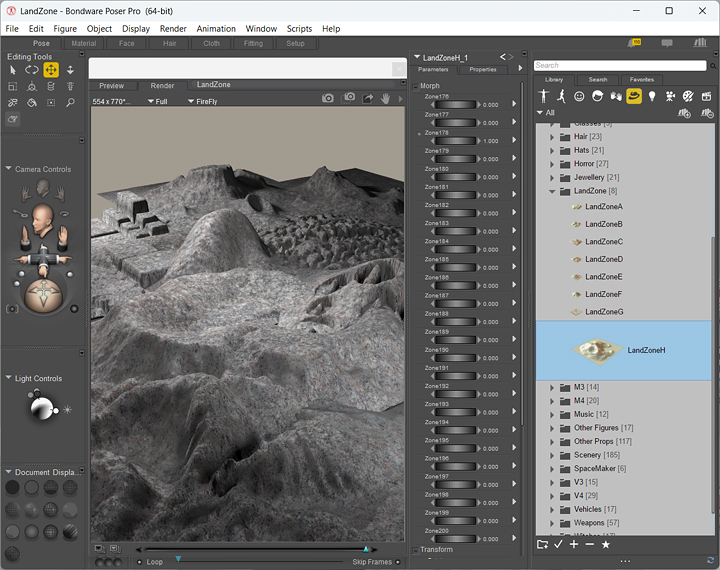
You can also scale the props to make them cover a larger area, but it is advisable to use a higher-res image texture in order to capture enough detail for your render. A sample texture and bump map are included but you can use any of your own textures if required.
If you wish to create more complex landscape designs then add several of the props to your scene, each with different settings, then move them around to achieve a suitable layout. Remember though rendering times will increase with the amount of props used, plus you will need enough memory to cope with larger scenes.
System Requirements
- Windows 7, 8, 10 or 11
- 2GB of RAM minimum
- 113MB of hard disk space
- Poser application
FREE Download
This product is FREEWARE. You may download it and use for both personal and commercial work, without any charge.

Installation
1. Unzip the LandZone.zip file above to the correct location in your Poser folder.
\Runtime\Libraries\Props\LandZone
2. Unzip the sample texture and bump map to the correct location in your Poser folder.
\Runtime\Textures\Cybia\LandZone
3. The next time you start Poser the props should be available in the Libraries\Props\LandZone menu section.
4. Load the props into your scene by double-clicking on the thumbnails.
5. Use the LandZone "Parameter Dials" to create a suitable terrain shape.
That's it, easy!
Please read the documentation that came with your Poser software for more information regarding the correct use of props and texture images.

If you have any questions then please use the Contact Form to get in touch, thanks!