


SpaceMaker 1.6
Build your own universe in Poser!
A series of astronomical props for use with Poser software. They allow you to quickly add real 3D planet-style objects directly inside Poser to give your scenes some extra dimension!
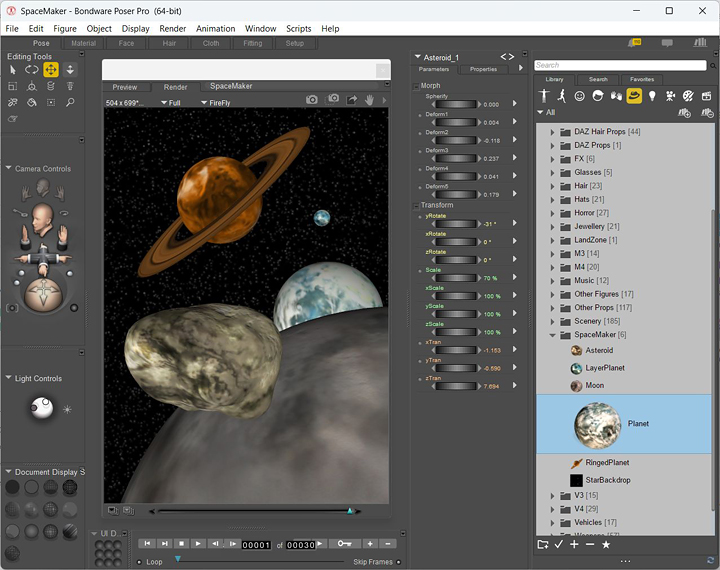
These props will provide you with the most common objects needed to add planets, moons and asteroids into your scenes. A sample texture map is provided for each prop.
Planet is a single-layer spherical prop with sample texture map.
LayerPlanet is a dual-layer spherical prop which uses separate texture maps for the land surface and clouds. Please note that for best results you should turn OFF shadows in the Poser render settings when using this particular prop, otherwise it will render black.
RingedPlanet is a single-layer spherical prop complete with outer ring element. The sphere and ring use separate texture maps.
Moon is a single-layer spherical prop with sample texture map.
Asteroid is a single-layer morphing prop which can change it's shape to create a variety of different asteriod style objects.
StarBackdrop is a basic flat background plane which is texture mapped with a starfield image. Ideal if you just need a quick backdrop behind your planet scene.
System Requirements
- Windows 7, 8, 10 or 11
- 2GB of RAM minimum
- 6.52MB of hard disk space
- Poser application
FREE Download
This product is FREEWARE. You may download it and use for both personal and commercial work, without any charge.

Installation
1. Unzip the SpaceMaker.zip file above to the correct location in your Poser folder.
\Runtime\Libraries\Props\SpaceMaker
2. Unzip the texture maps to the correct location in your Poser folder.
\Runtime\Textures\Cybia\SpaceMaker
3. The next time you start Poser the props should be available in the Libraries\Props\SpaceMaker menu section.
4. Load the props into your scene by double-clicking on the thumbnails.
5. Use the "Parameter Dials" to resize and move the props to the desired location in your scene.
That's it, easy!
Please read the documentation that came with your Poser software for more information regarding the correct use of props and texture images.

If you have any questions then please use the Contact Form to get in touch, thanks!